Create Deal
The Create Deal node group allows you to create deals in Countertop Studio using n8n in a structured, production-ready way.
The integration follows a strict separation of responsibilities:
- Normalize Deal → Structural transformation only
- Validate Deal → Business rule validation
- Send Deal → Secure API transmission
This separation prevents silent errors, makes debugging simple, and ensures that only valid data reaches the API.
Recommended Workflow Structure
The nodes should always be arranged in this order:
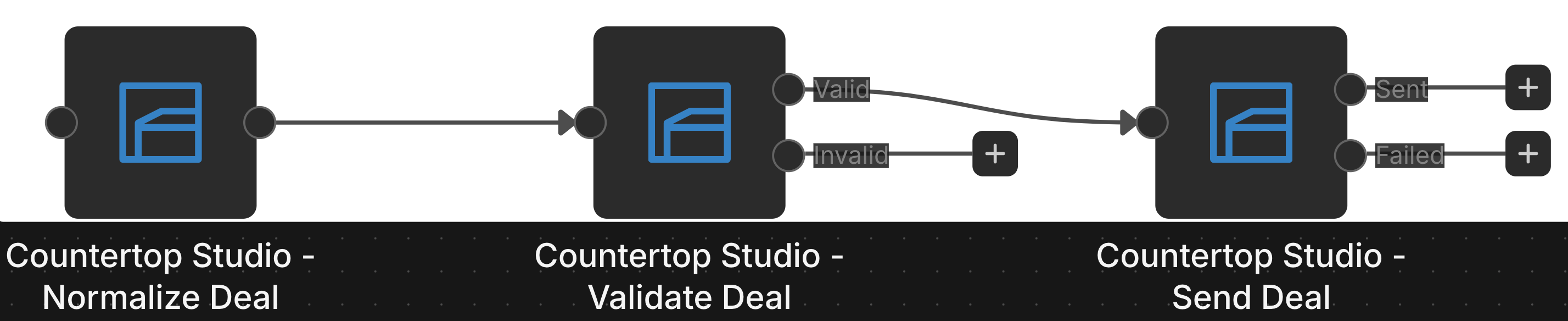
Why this structure?
- Normalize prepares the data.
- Validate enforces API rules.
- Send only processes validated items.
- Invalid data never reaches the API.
- Errors are visible and actionable.
Never connect Normalize → Send directly in production.
Normalize Deal
The Normalize Deal node transforms incoming workflow data into the structure expected by the Countertop Studio API.
It does NOT perform business validation.
What Normalize Does
- Maps fields using n8n expressions
- Trims whitespace from strings
- Converts empty strings to null
- Builds the correct API payload structure
- Supports multiple customers
What Normalize Does NOT Do
- It does not check required fields
- It does not validate UUIDs
- It does not block invalid customer combinations
- It does not enforce business logic
All validation is handled in the Validate Deal node.
Working with Customers
You can attach customers to a deal in two different ways.
Option 1: Existing Customers (UUIDs)
Use this when customers already exist in Countertop Studio.
Example output structure:
{
  "customer_ids": ["uuid-1", "uuid-2"]
}
You may provide multiple UUIDs.
Option 2: New Customer Objects
Use this when creating customers along with the deal.
Example output structure:
{
  "customers": [
    {
      "last_name": "John",
      "first_name": "Doe"
      //.. more data of this user
    },
    {
      "last_name": "Marie",
      "first_name": "Doe"
      //.. more data of this user
    }
  ]
}
You may provide multiple customer objects.
Important API Rule
The API supports:
- Multiple UUIDs
OR - Multiple customer objects
It does NOT support mixing both in a single request.
If both customer_ids and customers are present, validation will fail.
Normalize will not block this. Validate will.
Validate Deal
The Validate Deal node is responsible for enforcing business rules.
It provides two outputs:
- Valid
- Invalid
Only Valid items should continue to Send Deal.
Deal Validation Rules
- name must be present
- volume must be an integer (if provided)
- employee_id must be a valid UUID (if provided)
Customer Validation Rules
- customer_ids must be an array of valid UUIDs
- customers must be an array of objects
- If customers are used:
- Each customer must include last_name
- customer_ids and customers cannot be used together
- (Optional) At least one customer must be present
If any rule fails, the item is routed to Invalid.
Send Deal
The Send Deal node sends validated deals to the Countertop Studio API.
Each item results in exactly one HTTP request.
What Send Does
- Sends full customer_ids arrays
- Sends full customers arrays
- Automatically attaches:
- X-Api-Key
- X-Department-Id
- X-Request-Id
- Separates responses into:
- Sent
- Failed
Send assumes that validation has already been completed.
It does not repeat validation logic.
Common Mistakes and How to Avoid Them
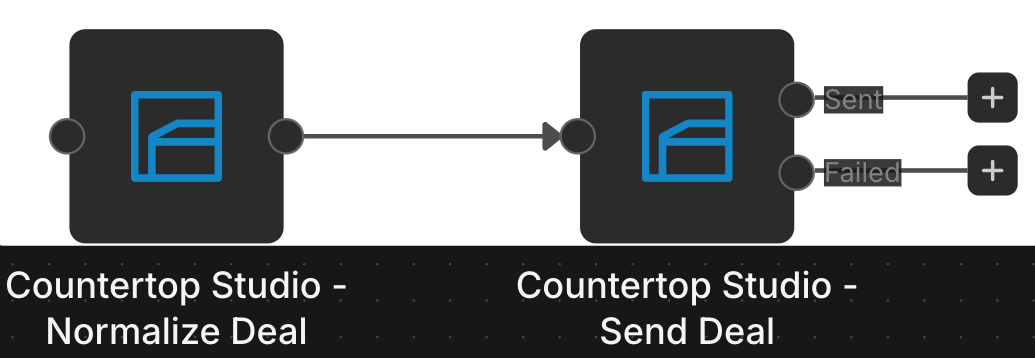
Mistake 1: Skipping Validation
Connecting Normalize Deal directly to Send Deal bypasses business validation. This can result in API errors, rejected requests, and unclear failures. Always place Validate Deal between Normalize and Send.
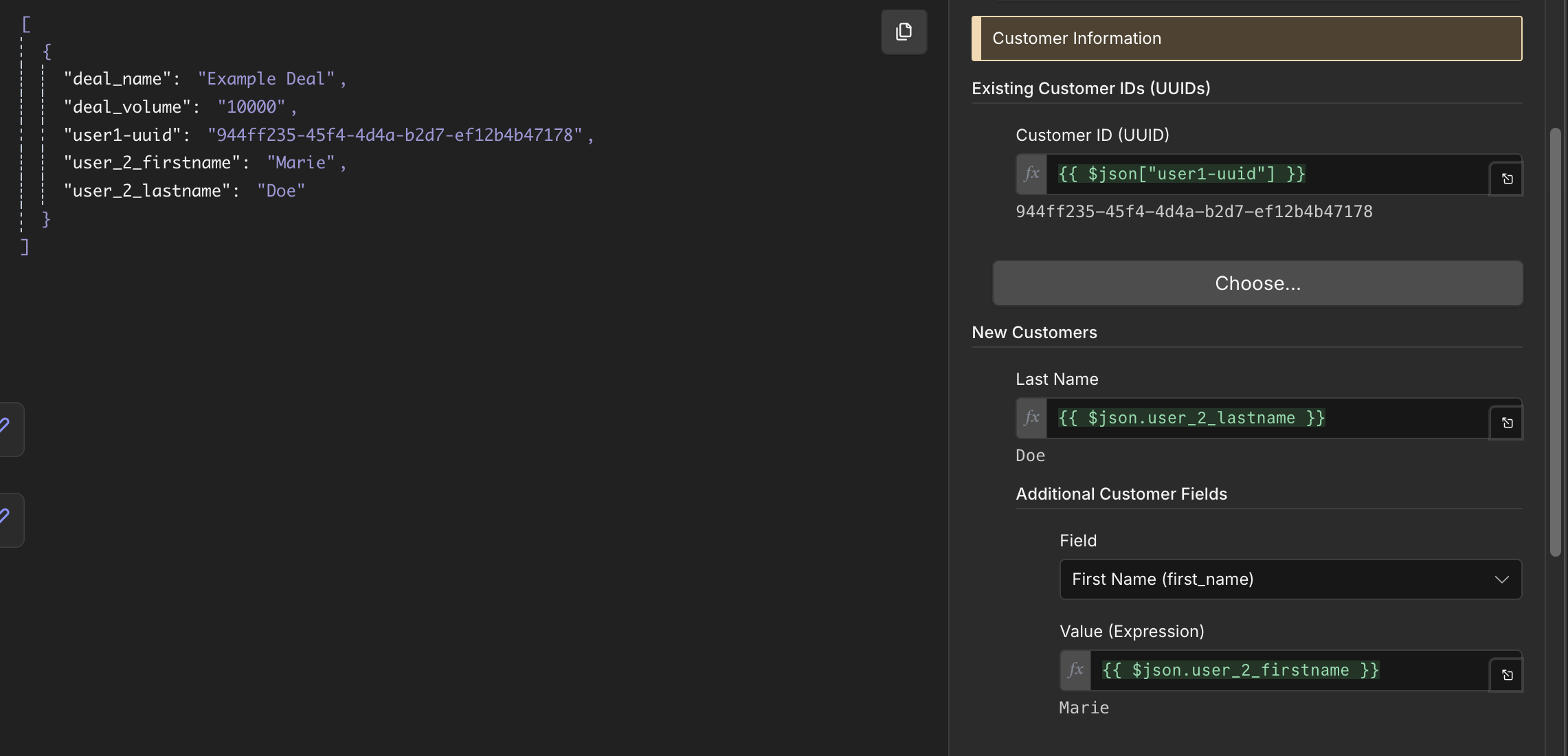
Mistake 2: Mixing Customer Modes
Do not configure both: Existing Customer IDs and New Customer Objects. Validate will block this.
Mistake 3: Ignoring Invalid Output
Always connect the Invalid output to:
- Logging
- Alerts
- Error responses
- Monitoring systems
Invalid items should never be silently dropped.
Production Best Practice
Recommended production setup:
- Log all Invalid items
- Implement retry logic for API failures
- Monitor Failed output of Send Deal
- Use structured logging for traceability
- Store requestId for debugging
This ensures transparency and reliability at scale.